

I'm not getting texts
Work through these in order.
-
Is your number linked? Open your profile and scroll to Phone number. It should show your number with "Verified" under it. If not, see Getting texts from Date Drop to link it.
-
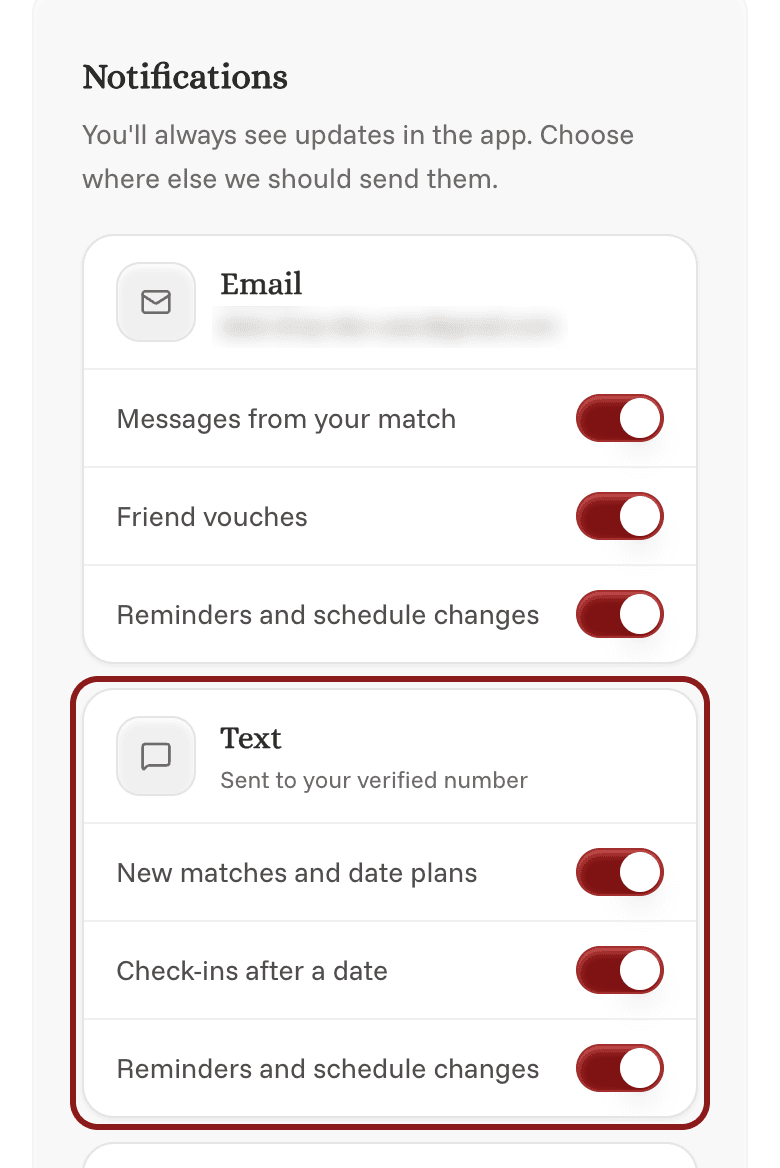
Are your texts turned on? Open Settings and go to Notifications. Under Text, make sure the texts you want are turned on: new matches and date plans, check-ins after a date, and reminders. If it says No phone number yet, tap Add phone to link your number.
-
Did you reply STOP? If you did, Settings will say so. Reply START to any of our texts to turn them back on.
-
Is our number blocked? Check that you haven't blocked our number, and that your phone isn't filtering texts from unknown senders into a separate folder.
To open Settings on your phone, tap the Profile icon at the bottom of the screen, then the gear icon in the top right, then Settings. On a computer, click your initials or photo in the top right, then Settings.
Messages from your match in the app aren't sent by text. You'll get those by email. See Email preferences.